
getting_domain_windows_server_s_licensing_status
This is an old revision of the document!
Getting domain Windows Server's licensing status
This PowerShell script performs the following steps:
- Includes a hashtable $licenseStatusDescriptions that maps each `LicenseStatus` value to its corresponding description. When adding the results to the array, it uses this mapping to convert the numeric `LicenseStatus` to a descriptive string.
- Queries all domain computers with an operating system that includes “Windows Server”.
- For each server, it retrieves the license status using the Get-CimInstance cmdlet.
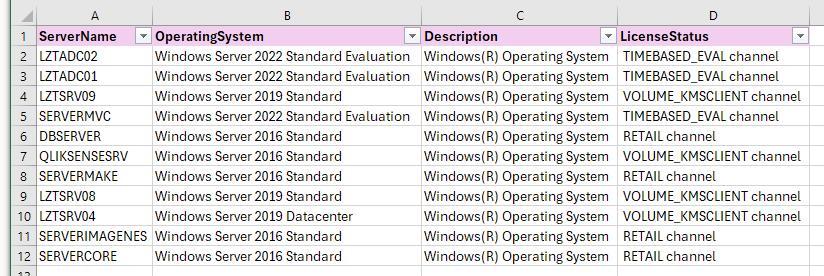
- Collects the results into an array.
- Exports the results to a CSV file located at C:\temp\WindowsServerLicenseStatus.csv.
# Import the Active Directory module
Import-Module ActiveDirectory

# Define a hashtable for license status descriptions
$licenseStatusDescriptions = @{
    0 = 'Unlicensed'
    1 = 'Licensed'
    2 = 'OOBGrace (Out of Box Grace)'
    3 = 'OOTGrace (Out of Tolerance Grace)'
    4 = 'NonGenuineGrace'
    5 = 'Notification'
    6 = 'ExtendedGrace'
}

# Get all Windows Server machines in the domain
$servers = Get-ADComputer -Filter "OperatingSystem -Like '*Windows Server*'" -Property Name, OperatingSystem

# Initialize an array to store the results
$results = @()

foreach ($server in $servers) {
    # Get the license status from each server
    $licenseStatus = Get-CimInstance -ComputerName $server.Name -ClassName SoftwareLicensingProduct -Filter "Name like 'Windows%'" | Where-Object { $_.PartialProductKey } | Select-Object Description, LicenseStatus

    foreach ($status in $licenseStatus) {
        # Map the LicenseStatus to its description
        $statusDescription = $licenseStatusDescriptions[$status.LicenseStatus]

        # Add the result to the array
        $results += [PSCustomObject]@{
            ServerName     = $server.Name
            OperatingSystem = $server.OperatingSystem
            Description    = $status.Description
            LicenseStatus  = $statusDescription
        }
    }
}

# Export the results to a CSV file
$results | Export-Csv -Path "C:\temp\WindowsServerLicenseStatus.csv" -NoTypeInformation
getting_domain_windows_server_s_licensing_status.1725288025.txt.gz · Last modified: 2024/10/17 21:42 (external edit)